Advanced Features
View a mobile running-hours counter
Open a counter and read its current value and last-read timestamp without saving a reading.
Overview
Use Running Hours to inspect an existing equipment counter. This read-only walkthrough follows Auxiliary Engine No.1 on BB COASTER from the counter list to its current reading.
Before You Start
- Sign in with Running Hours viewing access and open mobile Home.
- The selected vessel must already have a counter with a reading.
Step-by-Step Instructions
-
Choose the counter
Choose Running Hours from Home.
Select the vessel if the vessel selector is shown. The example uses BB COASTER.
Locate the equipment counter and read its current value on the card.
Choose Auxiliary Engine No.1 - Running Hours, or your corresponding existing counter.
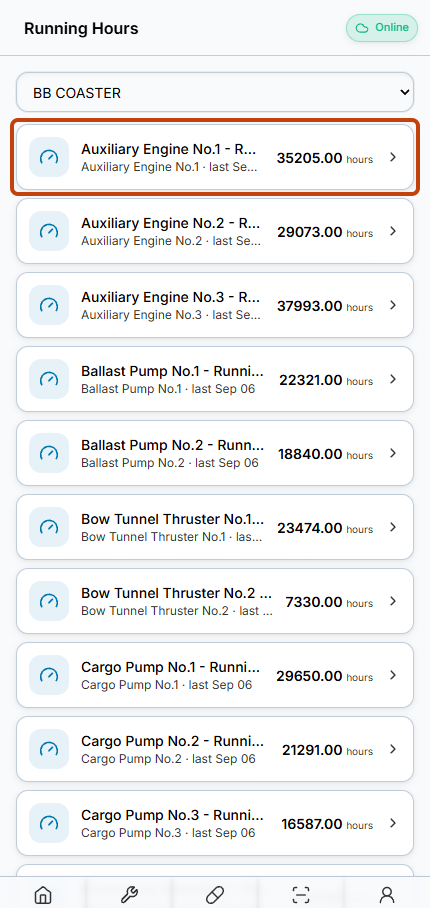
The counter card shows the equipment name, latest value and last-reading date. -
Read the current value without saving
Confirm the counter name and equipment name on the detail page.
Read the large current value, its unit and the Last read timestamp.
For a viewing-only task, leave the new-reading fields untouched and do not choose Save reading.
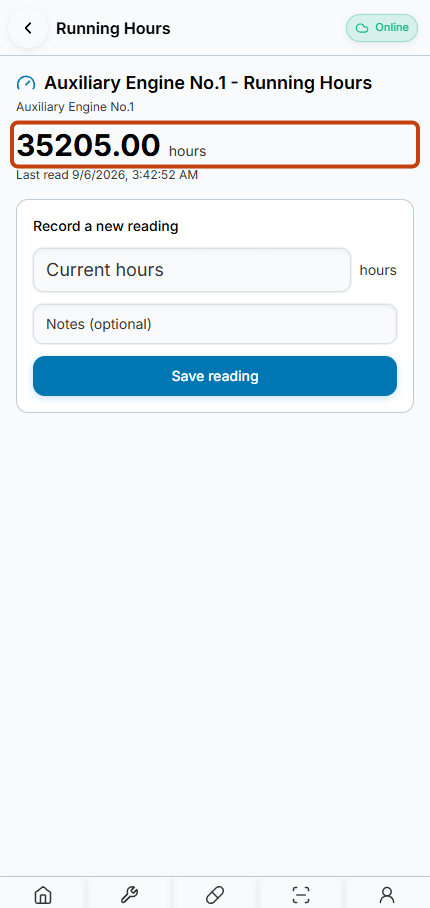
The detail page displays the current counter value and Last read timestamp.
Result
You have viewed the counter value and last-read timestamp without changing the reading.
FAQs
Was Save reading tested?
No. This guide is deliberately read-only; the form is visible in the screenshot but was not submitted.