Advanced Features
Switch between mobile and desktop views
Open the desktop interface from mobile Profile and return using Mobile view.
Overview
Use the Profile view switch when you need to leave the mobile interface. This walkthrough verifies the switch and the return path at a phone-sized viewport, not the desktop features themselves.
Before You Start
- Sign in and open the mobile interface at /m.
- Keep the browser at phone width so the Mobile view return control can appear.
Step-by-Step Instructions
-
Switch from Profile
Choose Profile in the bottom navigation.
Choose Switch to desktop view. Do not choose Sign out.
Wait for the desktop root page to open.
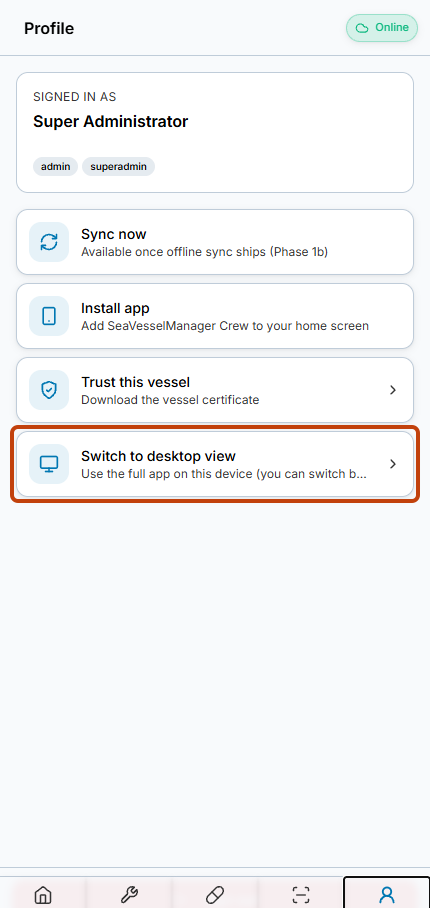
Switch to desktop view is available from the mobile Profile page. -
Return to the mobile interface
On the desktop interface, locate Mobile view near the bottom of the screen.
Choose Mobile view to return to mobile Home.
The return action also clears the desktop-view preference used by this switch.
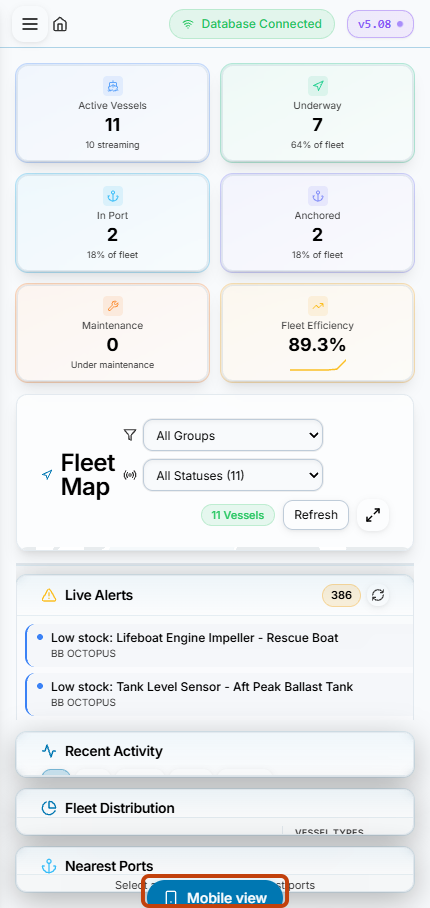
Mobile view returns from the desktop interface to mobile Home.
Result
You have opened the desktop interface and returned to mobile Home without signing out or changing application records.
FAQs
Did the test leave desktop view enabled?
No. Verification returned through Mobile view and confirmed that the desktop-view preference was cleared.