
SeaVesselManager
Enterprise Maritime Planned Maintenance System
SeaVesselManager is a modern, offline-first Planned Maintenance System (PMS) designed specifically for the maritime industry. Built for ship owners, fleet operators, and technical managers who need reliable maintenance tracking across distributed vessel operations.
The system operates on a distributed architecture where each vessel maintains a complete local database, synchronizing bi-directionally with the central office when connectivity permits. This ensures 100% operational capability even during extended periods at sea without internet access.
Whether you manage a single vessel or a fleet of 50+ ships, SeaVesselManager scales to meet your needs while maintaining full regulatory compliance with ISM Code, SOLAS, and class society requirements.
Who Is It For?
Ship Owners
Fleet-wide visibility, compliance reporting, cost analysis, and procurement management from a central dashboard.
Technical Managers
Equipment lifecycle tracking, PM scheduling, class survey preparation, and maintenance history analysis.
Vessel Crew
Offline-capable job execution, spare part consumption, inspection logging, and work order completion from any device onboard.
Core Features
Fleet Dashboard
Real-time vessel tracking with AIS integration (Datalastic, Marinesia, AISstream), weather overlays via Windy API, and maritime chart layers including sea markers, shipping lanes, and piracy zones.
Planned Maintenance
SFI-coded equipment registry, time and running-hours based PM schedules, automatic work order generation, job assignment, and complete maintenance history with 10-year retention.
Inventory & Procurement
Spare parts management with stock levels, consumption tracking, requisition workflow, RFQ management, quotation comparison, and purchase order generation.
Compliance & Certificates
Vessel and crew certificate tracking with expiry alerts, class survey scheduling, finding management, QHSE incident reporting, and ISM Code audit trails.
Offline-First Sync
Full functionality without internet. Local PostgreSQL on each vessel with queue-based sync to office. Works with Starlink, VSAT, or any intermittent connection. Zero data loss.
AIVA - AI Assistant
Artificial Intelligence Vessel Assistant for natural language queries. Ask questions like "Show overdue work orders for MV Nordic Star" or "Export maintenance costs for Q4".
System Architecture
Office Server (Cloud)
- • Central hub for all fleet data
- • Master data management (equipment, plans)
- • Procurement and reporting
- • Sync coordinator for all vessels
- • User and role administration
Vessel Server (Onboard)
- • Complete local database replica
- • 100% offline operation
- • Job execution and logging
- • Spare part consumption
- • Auto-sync when online
Technology Stack
Frontend
Backend
Regulatory Compliance
Quick Start Guide
Installation guides and getting started with SeaVesselManager.
Choose Your Deployment
Office / Cloud Installation
Central server for fleet management, reporting, and crew coordination. Recommended for ship owners and technical managers.
- • Fleet-wide dashboard
- • Multi-vessel management
- • Procurement & reporting
- • Sync hub for vessels
Vessel Installation
Onboard system with full offline capability. Perfect for vessels with limited or intermittent connectivity (Starlink/VSAT).
- • Works 100% offline
- • Local PostgreSQL database
- • Auto-sync when online
- • Crew job execution
System Requirements
Office Server (Production)
- • Cloud: DigitalOcean, AWS, Azure, or self-hosted
- • OS: Ubuntu 22.04+ / Debian 12+ / Windows Server 2019+
- • RAM: 4GB minimum, 8GB recommended
- • Storage: 50GB SSD
- • Docker: Docker Engine 24+ with Compose
- • Database: PostgreSQL 16+ (managed or local)
Vessel Server (Onboard)
- • Hardware: Mini PC, laptop, or industrial PC
- • OS: Ubuntu Server / Windows Server 2019+ / Windows 10/11 Pro
- • RAM: 4GB minimum
- • Storage: 128GB SSD
- • Network: LAN access for crew devices
- • Internet: Starlink/VSAT (for sync only)
🏢 Office Installation (15 minutes)
Provision Cloud Server
Create a Droplet (DigitalOcean) or VM with Docker pre-installed. Select 4GB RAM, Ubuntu 24.04.
ssh root@YOUR_SERVER_IPClone Repository & Configure
Download the application and set environment variables.
git clone https://github.com/singh92/SVMSeaVesselManager.git /opt/SVMSeaVesselManagercd /opt/SVMSeaVesselManagercp .env.example .env.productionnano .env.production # Configure DB, JWT secret, domainDeploy with Docker Compose
Build and start all services (PostgreSQL, Redis, Backend, Frontend).
docker compose -f docker-compose.production.yml up -d --buildConfigure SSL & Domain
Point your domain DNS to the server and obtain SSL certificate.
apt install certbot python3-certbot-nginxcertbot --nginx -d yourdomain.comAccess Your Installation
Visit https://yourdomain.com/app and login with default admin credentials.
🚢 Vessel Installation (Onboard Setup)
Prepare Vessel Hardware
Install Ubuntu Server on vessel PC. Connect to ship's LAN and configure static IP (e.g., 192.168.1.100).
Generate Vessel Snapshot (Office)
From the office system, generate a provisioning snapshot containing vessel data, equipment, and maintenance plans.
Deploy Vessel Application
Install Docker and deploy SeaVesselManager in vessel mode.
export SVM_MODE=VESSELexport OFFICE_URL=https://yourdomain.com/api/v1docker compose -f docker-compose.vessel.yml up -dImport Provisioning Package
Upload the snapshot to initialize the vessel database with equipment, PM schedules, and spare parts.
POST /api/v1/provision/import-snapshotVessel Ready
Crew can access http://192.168.1.100:3000 from any device on ship's LAN. Works 100% offline.
🔄 Understanding Sync
Master data (equipment specs, PM plans, spare catalog) pushes to vessels via WebSocket or 30-min polling.
Execution data (job completion, measurements, spare consumption) syncs to office when connectivity available.
All mutations queued locally. Syncs automatically when online. No data loss during network outages.
📋 First Steps After Installation
- 1Change Admin Password - Go to Profile → Security → Change Password
- 2Add Your Fleet - Fleet → Add Vessel → Enter IMO, MMSI, vessel details
- 3Import Equipment - Assets → Import → Upload SFI-coded equipment list (Excel template available)
- 4Set Up PM Schedules - Maintenance → PM Schedules → Create time/hour-based intervals
- 5Add Users & Roles - Admin → Users → Invite crew with appropriate permissions
- 6Provision Vessels - Generate snapshot packages for each vessel installation
Fleet Dashboard
Real-time vessel tracking, weather overlays, and fleet-wide KPIs.
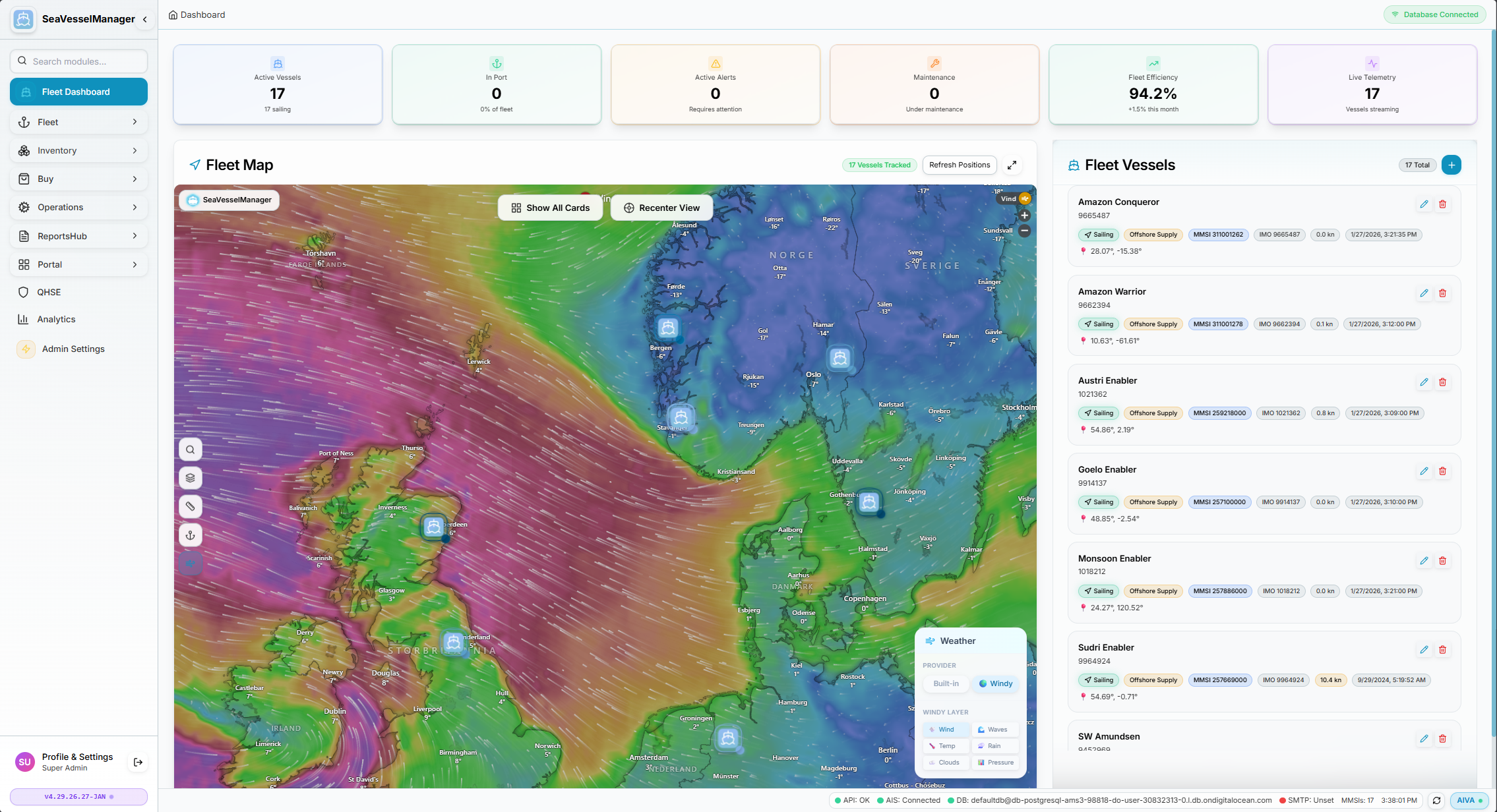
Fleet Dashboard showing live vessel positions with Windy weather overlay enabled
Dashboard Overview
The Fleet Dashboard is your central command center for monitoring all vessels in real-time. It combines AIS tracking, weather data, and fleet KPIs in a single view.
Zoomable world map with vessel markers, click to select and view details.
Top bar shows: Active Vessels, In Port, Alerts, Maintenance Due, Fleet Efficiency, Telemetry.
Right panel with all vessels, status badges, position coordinates, and quick actions.
🌤️ How to Enable Weather Overlay
The weather overlay powered by Windy API shows real-time wind patterns, waves, temperature, and more across the map.
Locate the Weather Panel
Look at the bottom-right corner of the map. You'll see a floating panel labeled "Weather".
Click the Provider Button
Click the 🌬️ Windy button to enable the weather layer.
Choose Weather Layer
Select from the available layers in the "WINDY LAYERS" section:
Weather Active
The map will now display animated weather patterns. Wind shows as flowing arrows, waves as color gradients showing wave height.
🎮 Map Controls
Top Toolbar
Left Sidebar Layers
🚢 Vessel Interactions
Click Vessel on Map
Shows info card with vessel name, type, MMSI, IMO, position, speed, and heading.
Click Vessel in List
Pans map to vessel location and selects it. Shows the same info card.
Double-Click Vessel
Opens the vessel detail page with full information, maintenance, certificates.
Status Badges
Each vessel shows status: Sailing Offshore Supply MMSI IMO
📡 AIS Data Sources
SeaVesselManager uses multiple AIS providers with automatic cascade fallback:
Status shown in footer: ● AIS Connected indicates live data feed.
Available Map Layers
Maintenance & PMS
Comprehensive planned maintenance system for managing all vessel work orders, preventive maintenance schedules, and repairs.
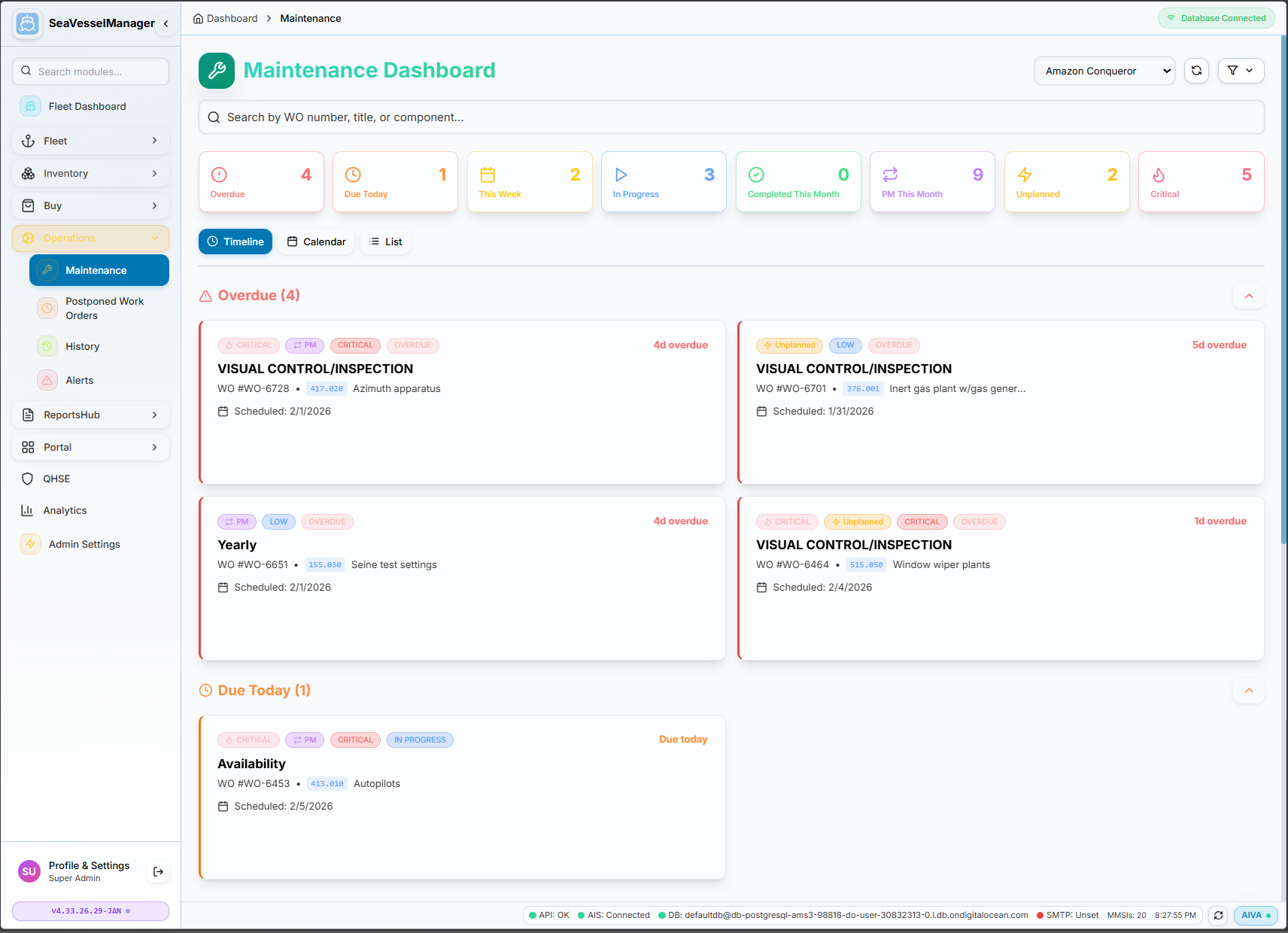
Maintenance Dashboard showing work order status with Timeline view and KPI metrics
📊 Dashboard Overview
The Maintenance Dashboard provides a complete overview of all work orders across your fleet. Filter by vessel using the dropdown in the top-right corner.
KPI Metric Cards
Click any KPI card to filter the work order list to show only those items.
👁️ View Modes
Switch between three different views to manage your work orders:
Work orders grouped by status (Overdue, Due Today, This Week, etc.) with color-coded cards showing priority and type badges.
Monthly calendar displaying work orders on their scheduled dates. Useful for planning and visualizing workload distribution.
Traditional table view with sortable columns. Best for detailed filtering, searching, and bulk actions.
📋 Work Order Types
SeaVesselManager supports multiple work order types to handle all maintenance scenarios:
Recurring preventive maintenance jobs linked to PM schedules. Automatically generates next occurrence when completed.
One-time work orders for repairs, defects, breakdowns, or non-recurring tasks. Created manually when issues arise.
Visual inspections, functional tests, and condition monitoring tasks with checklist support.
Large-scale maintenance projects requiring vessel to be out of service. Linked to class surveys and major equipment overhauls.
🏷️ Work Order Card Information
Each work order card displays:
- Status Badges — Color-coded tags showing PM/Unplanned type, priority level (Critical, High, Medium, Low), and status (Overdue, In Progress)
- Title — Job description (e.g., "Visual Control/Inspection", "Availability Check")
- Work Order Number — Unique identifier (e.g., WO #WO-6728)
- SFI Code — Equipment classification code linking to the asset (e.g., 417.026)
- Component — Equipment name (e.g., "Azimuth apparatus", "Autopilots")
- Scheduled Date — When the work is due
- Overdue Indicator — Days overdue shown in red (e.g., "4d overdue")
⚡ Priority Levels
Immediate action
Within 24 hours
This week
When convenient
🔄 Work Order Workflow
Completed work orders are automatically archived to Maintenance History for regulatory compliance and audit trails.
✨ Key Features
Assets & Equipment
Complete vessel equipment and components inventory organized by SFI (Ship Functional Identification) codes.
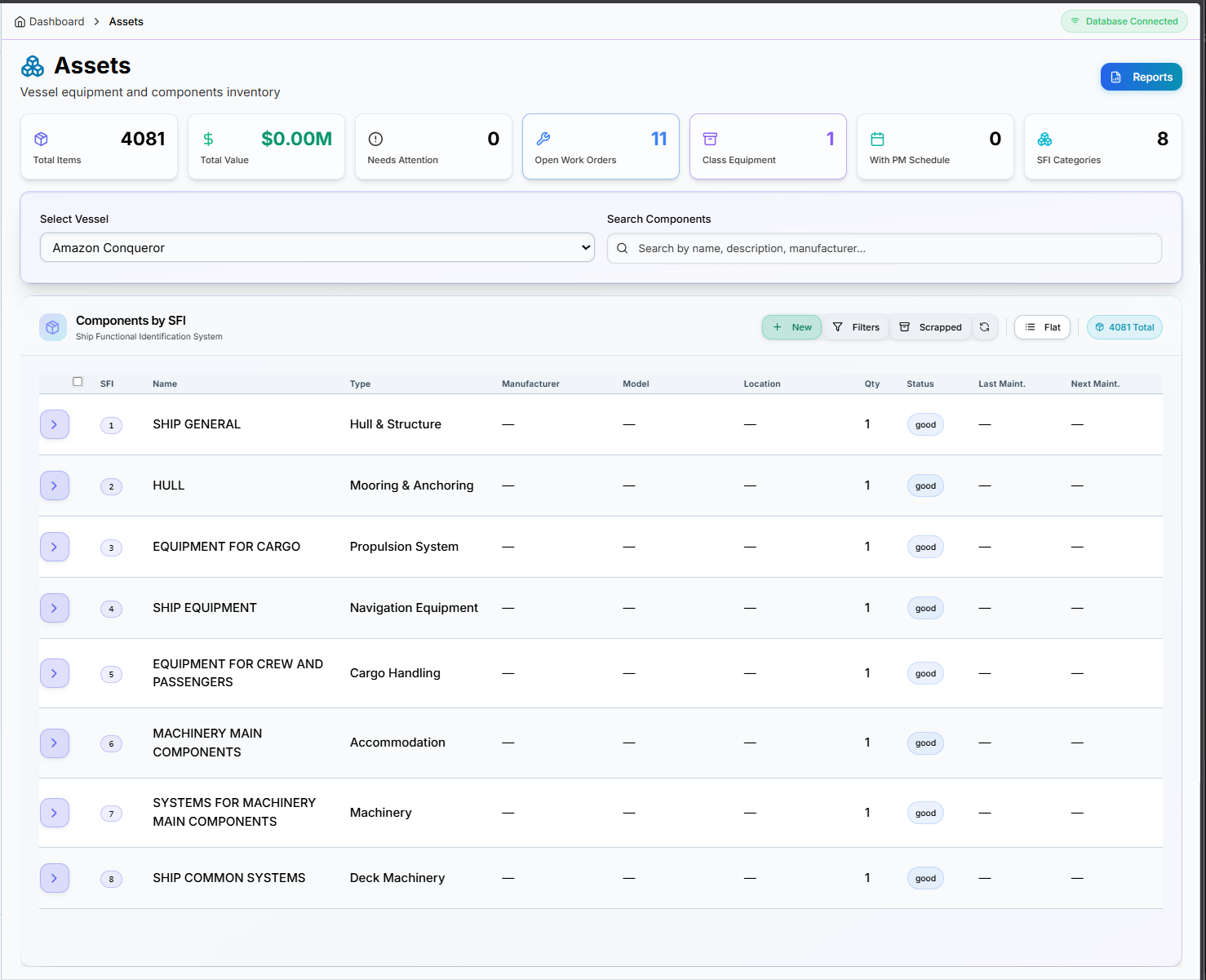
Assets page showing SFI-organized equipment hierarchy with KPI metrics
📊 Dashboard KPIs
Quick overview metrics for your vessel's equipment inventory:
🏷️ SFI Classification System
Equipment is organized using the international SFI (Ship Functional Identification) coding system:
Click any SFI group to expand and view sub-components. The hierarchy supports unlimited nesting levels.
📋 Components Table
Each equipment item displays the following information:
| Column | Description |
|---|---|
| SFI | SFI code number (e.g., 417.026) |
| Name | Component name/description |
| Type | Equipment category (Hull & Structure, Navigation, Machinery, etc.) |
| Manufacturer | OEM/vendor name |
| Model | Model/part number |
| Location | Physical location on vessel |
| Qty | Quantity installed |
| Status | Condition (Good, Fair, Poor, Scrapped) |
| Last Maint. | Date of last maintenance |
| Next Maint. | Next scheduled maintenance |
👁️ View Options
Default view with expandable SFI groups. Click the arrow to expand any category and see child components.
Shows all components in a flat table. Better for searching and filtering across the entire inventory.
✨ Key Features
Spare Parts Module
Complete inventory management system with SFI-based organization, real-time stock tracking, supplier management, and equipment linking for maritime operations.
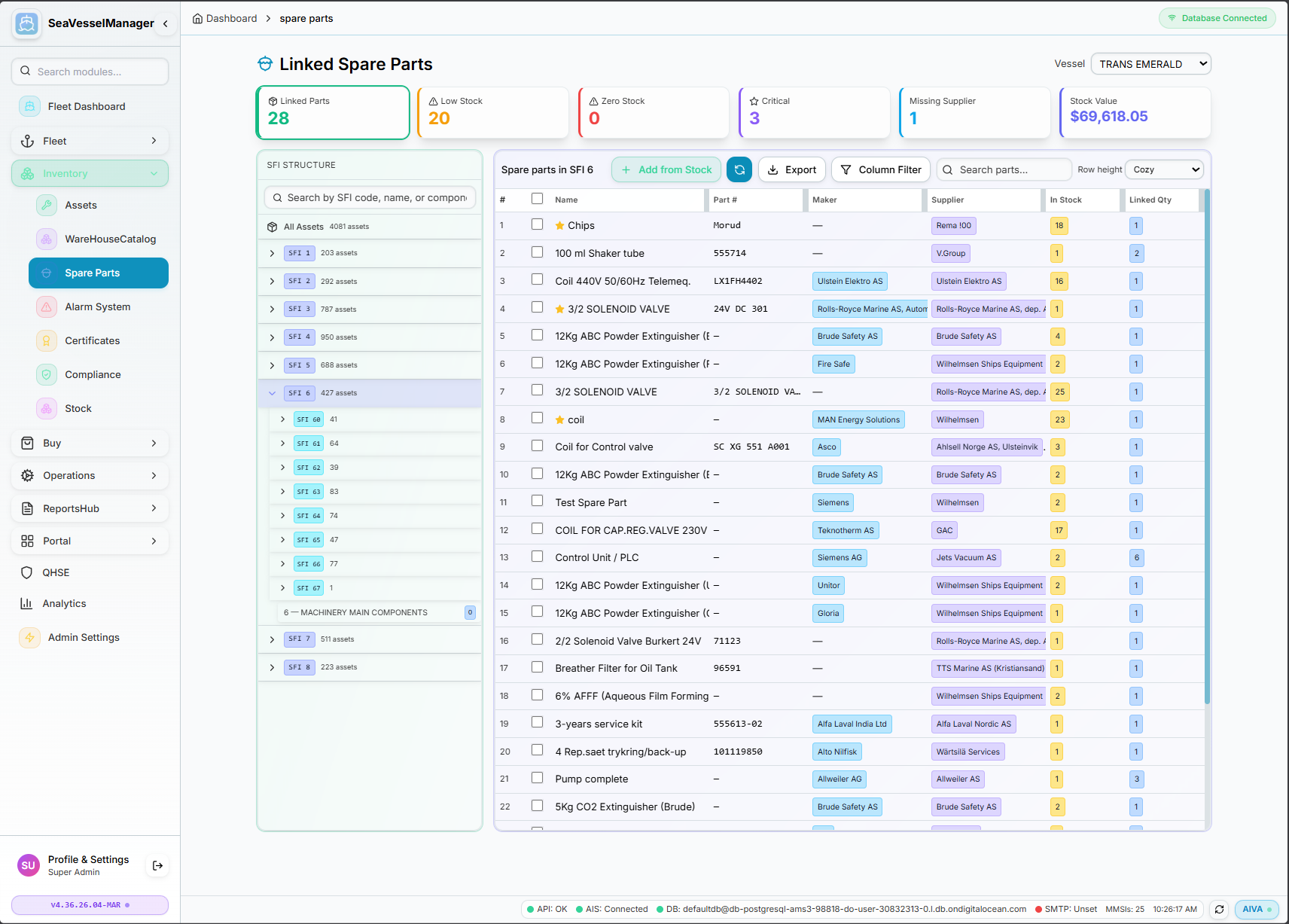
Linked Spare Parts view showing SFI-organized inventory with stock levels, suppliers, and equipment associations
📊 Real-Time Dashboard
Monitor your spare parts inventory at a glance with live KPI cards:
🗂️ SFI-Based Organization
Parts are organized using the maritime standard SFI (Ship Function Identification) coding system:
⚙️ Core Features
📋 Data Fields
Each spare part record contains comprehensive information:
| Field | Description |
|---|---|
| Name | Descriptive name of the spare part |
| Part # | Manufacturer or internal part number |
| Maker | Original equipment manufacturer (OEM) |
| Supplier | Vendor/supplier with contact details |
| In Stock | Current quantity available |
| Linked Qty | Quantity linked to specific equipment |
| Min Stock | Minimum level before reorder alert |
| Unit Price | Cost per unit for value calculation |
🛠️ Available Actions
🚢 Vessel-Specific Inventory
Switch between vessels to view and manage vessel-specific spare parts inventory. Each vessel maintains its own stock levels and linked equipment.
🔗 Module Integration
The Spare Parts module integrates seamlessly with other SeaVesselManager modules:
Procurement
Purchase orders, requisitions, RFQs.
Documentation Coming Soon
We're working on comprehensive documentation for the Procurement module.
Workflow Preview
Certificates
Complete maritime certificate management for vessel statutory documents and crew competency certificates with expiry tracking and compliance monitoring.
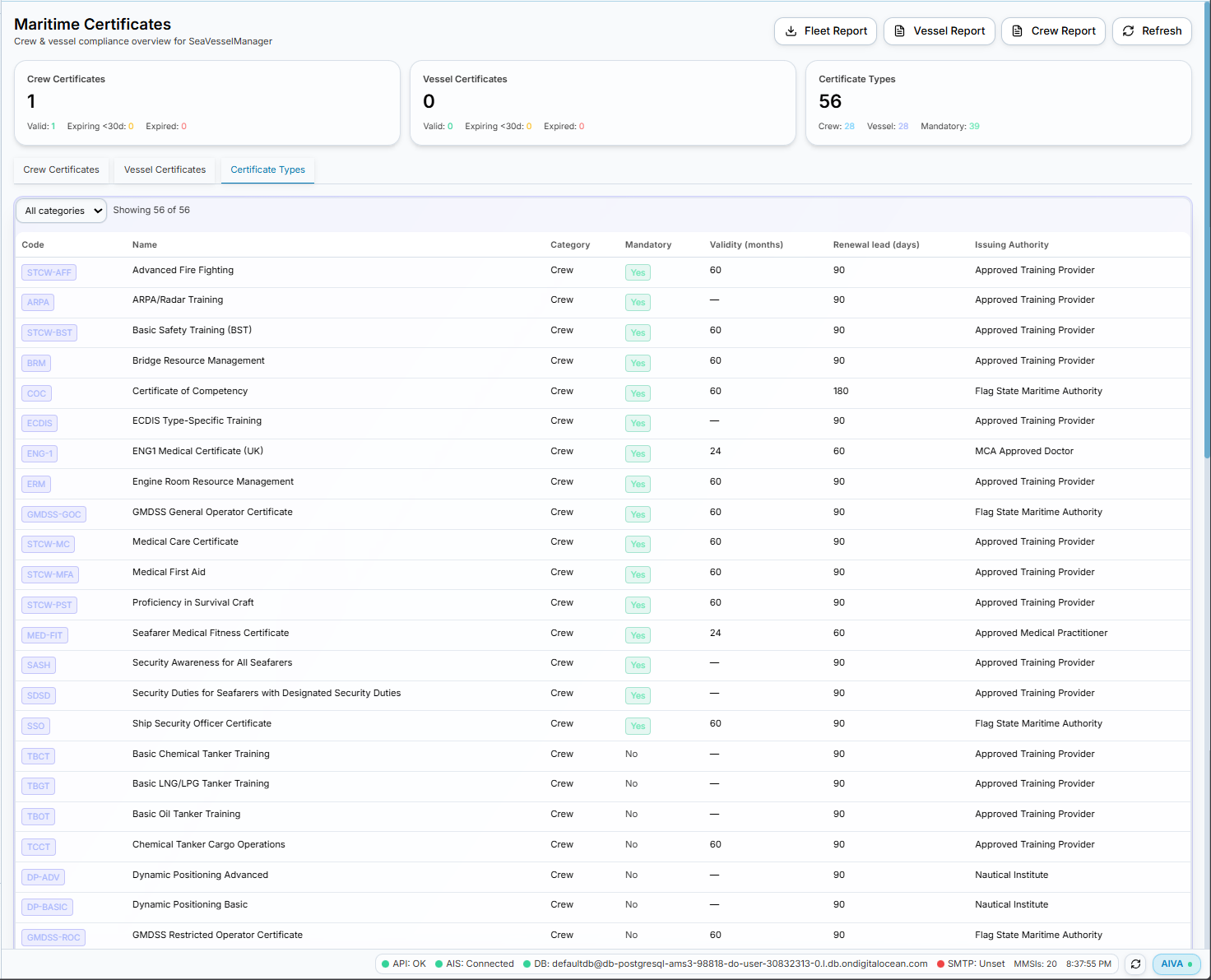
Certificate Types view showing crew and vessel certificate definitions with validity periods
📊 Dashboard Overview
Quick status overview of all certificates across your fleet:
📑 Certificate Views
All certificates held by crew members. Filter by crew member, certificate type, or validity status.
Statutory vessel documents including class certificates, safety certificates, and flag state documents.
Master list of all certificate types with codes, validity periods, renewal lead times, and issuing authorities.
👤 Crew Certificate Types
STCW and maritime competency certificates tracked for all crew members:
🚢 Vessel Certificate Types
Statutory and class certificates required for vessel operation:
Safety Certificates
- • SMC — Safety Management Certificate
- • ISSC — International Ship Security Certificate
- • DOC — Document of Compliance
- • Safety Construction — SOLAS compliance
- • Safety Equipment — LSA/FFA compliance
- • Safety Radio — GMDSS compliance
Class & Statutory
- • Class Certificate — Classification society
- • Load Line — International Load Line
- • IOPP — Oil Pollution Prevention
- • IAPP — Air Pollution Prevention
- • ISPP — Sewage Pollution Prevention
- • Tonnage — International Tonnage
📋 Certificate Type Definition
Each certificate type includes:
| Field | Description |
|---|---|
| Code | Short identifier (e.g., STCW-BST, COC, SMC) |
| Name | Full certificate name |
| Category | Crew or Vessel |
| Mandatory | Yes/No — required for compliance |
| Validity (months) | Standard validity period (e.g., 60 months = 5 years) |
| Renewal Lead (days) | Days before expiry to start renewal (e.g., 90 days) |
| Issuing Authority | Flag State, Class Society, Training Provider, etc. |
⚠️ Expiry Alerts & Notifications
Automatic alerts for certificates approaching expiry:
📊 Available Reports
Class Surveys
Classification society surveys and findings.
Documentation Coming Soon
We're working on comprehensive documentation for the Class Surveys module.
Survey Types Preview
QHSE
Quality, Health, Safety & Environment.
Documentation Coming Soon
We're working on comprehensive documentation for the QHSE module.
Incidents
- • Near miss reporting
- • Accident documentation
- • Root cause analysis
- • Corrective actions
Inspections
- • Safety inspections
- • Finding documentation
- • Follow-up tracking
- • Risk assessments
Voyages
Track voyages, port calls, fuel consumption.
Documentation Coming Soon
We're working on comprehensive documentation for the Voyages module.
Features Preview
- Port Calls - Arrivals, departures, berth info, expenses
- Fuel - Bunker ROB, consumption rates, efficiency
- Reports - Noon reports, arrival/departure, summaries
Crew Management
Crew assignments and certificates.
Documentation Coming Soon
We're working on comprehensive documentation for the Crew module.
Features Preview
- Roster - Current crew with positions and contact
- History - Rotation, sign-on/sign-off dates
- Certificates - Monitor crew certificate validity
Documents
Document management with version control.
Documentation Coming Soon
We're working on comprehensive documentation for the Documents module.
Document Types
AIVA - AI Vessel Assistant
Your intelligent assistant for fleet management, powered by advanced AI.
Hi, I'm AIVA!
Artificial Intelligence Vessel Assistant — your smart companion for managing fleet operations. I can read your database, analyze trends, generate reports, and answer questions in natural language.
Just type your question or request, and I'll help you find the information you need instantly — no complex queries or navigation required.
🧠 Core Capabilities
Database Intelligence
AIVA has read access to your entire SeaVesselManager database. Ask about vessels, equipment, work orders, spare parts, crew, certificates — anything stored in the system.
Report Generation
Generate custom reports on demand. Maintenance summaries, cost analysis, compliance status, equipment history — AIVA creates formatted reports you can export.
Data Analysis
Analyze trends across your fleet. Identify maintenance patterns, track KPIs over time, compare vessel performance, and spot anomalies before they become problems.
Export & Download
Export query results to Excel, CSV, or PDF. Download work order lists, spare part inventories, equipment registers, or any data set you request.
📋 What AIVA Can Access
AIVA has comprehensive read access to all modules in SeaVesselManager:
� Example Questions
Just ask in natural language — AIVA understands context and intent:
- "Show all overdue work orders for MV Nordic Star"
- "What maintenance is due next week across the fleet?"
- "List all open jobs on the main engine of Amazon Warrior"
- "How many work orders were completed last month?"
- "Generate a maintenance cost report for Q4 2025"
- "Create an equipment breakdown summary for Austri Enabler"
- "Export spare part consumption for the last 6 months"
- "Build a compliance status report for the entire fleet"
- "Where is MV Goeio Enabler right now?"
- "Who is the Chief Engineer on Amazon Conqueror?"
- "Which vessels have certificates expiring in 30 days?"
- "What's the fleet efficiency percentage this month?"
- "What spare parts are below minimum stock level?"
- "Show pending purchase orders over $5,000"
- "List all requisitions awaiting approval"
- "Which suppliers have the best delivery times?"
📄 Reports AIVA Can Generate
Maintenance Reports
- • Work Order Status Summary
- • Overdue Maintenance List
- • Equipment History Report
- • PM Schedule Compliance
- • Maintenance Cost Analysis
Fleet Reports
- • Vessel Position Report
- • Fleet KPI Dashboard
- • Crew Assignment Matrix
- • Certificate Expiry Report
- • Voyage Summary Report
Compliance Reports
- • Class Survey Status
- • Open Findings Report
- • QHSE Incident Summary
- • Audit Trail Export
- • ISM Compliance Check
🚀 How to Access AIVA
From Any Page
Conversation Features
- • Conversation history is saved
- • Start new conversations anytime
- • Context-aware follow-up questions
- • Copy responses to clipboard
- • Download generated reports
💡 Tips for Best Results
Reports & Analytics
KPI dashboards and reporting.
Documentation Coming Soon
We're working on comprehensive documentation for the Reports module.
Report Categories
Maintenance
- • Work order status
- • Cost trends
- • Equipment breakdown
Compliance
- • Certificate expiry
- • Survey status
- • Deficiency tracking
Export Formats
Changelog
Latest updates to SeaVesselManager.
API Reference
RESTful API for integrations.
Base URL
https://seavesselmanager.com/api/v1Authentication
JWT Bearer token:
Authorization: Bearer <token>Sync & Replication
Bidirectional data synchronization between office and vessels.
Architecture Overview
Office Server
Central hub, master data
Vessel Server
Local replica, offline-first
SeaVesselManager uses PostgreSQL on both office and vessel nodes. Changes are tracked via database triggers and synchronized using a queue-based system. Vessels operate fully offline and sync when connectivity is available.
Key Components
Change Log
PostgreSQL triggers automatically capture all INSERT, UPDATE, and DELETE operations on sync-enabled tables. Each change is logged with entity type, operation, field changes, and vessel ID.
Outbound Queue
Distribution process moves changes from the central change log to per-vessel outbound queues. Each vessel only receives changes relevant to their data scope.
Package Manifest
Changes are bundled into sync packages with compression support. Packages track sequence numbers, checksums, and delivery status for reliable synchronization.
Inbound Queue
Received packages are placed in the inbound queue for processing. Conflict detection compares timestamps and resolves using last-write-wins or custom rules.
Database Schema
| Table | Purpose | Key Fields |
|---|---|---|
| replication_nodes | Registry of office/vessel nodes | node_code, node_name, node_type, status, vessel_id |
| change_log | All mutations tracked | operation_id, origin_node_id, entity_type, entity_id, operation, payload |
| outbound_queue | Per-node pending changes | node_id, change_log_id, operation_id, status |
| inbound_queue | Received packages pending apply | package_id, package_data, status, applied_at |
| package_manifest | Package tracking & checksums | package_code, seq_start, seq_end, checksum |
| replication_state | Per-entity sync cursors | node_id, entity_type, last_synced_seq, last_synced_at |
| replication_events | Audit log for debugging | event_type, node_id, severity, details, created_at |
Sync-Enabled Tables (10)
The following tables support bidirectional sync with origin tracking and field-level merge:
Admin Interface
Access replication management at Admin → Replication
Change Log Tab
- • View all database mutations
- • Filter by entity type
- • See INSERT/UPDATE/DELETE
- • Track field-level changes
Outbound Queue Tab
- • Per-vessel pending changes
- • Manual distribution trigger
- • Queue depth monitoring
- • Retry failed items
Settings Tab
- • Distribution interval config
- • 5 seconds to 1 hour range
- • Manual "Run Now" button
- • Scheduler status display
How Synchronization Works
Detect
TypeORM subscriber captures INSERT, UPDATE, DELETE on sync-enabled tables. Logs to change_log with operation_id.
Distribute
Background scheduler (default: 30s) copies changes to outbound_queue for each registered vessel node.
Package
Queue items bundled into JSON packages with checksums. Tracked in package_manifest for delivery status.
Transport
Packages sent via REST API when online. Works over Starlink, VSAT, or any connection. Retries automatically on failure.
Apply & Merge
Vessel validates, applies field-level merge, updates cursors, sends ACK. Conflicts auto-resolved per authority rules.
↔️ Bidirectional:
Same flow works in reverse. Vessels push changes to office via POST /api/v1/replication/vessel/push
API Endpoints
/api/v1/replication/queue
Get all change log entries (paginated)
/api/v1/replication/outbound
Get outbound queue items per vessel
/api/v1/replication/settings
Get distribution interval and scheduler status
/api/v1/replication/settings/interval
Update distribution interval (5-3600 seconds)
/api/v1/replication/distribute
Trigger immediate distribution run
/api/v1/replication/health
Get sync health metrics for all nodes
Conflict Resolution (Field-Level Merge)
When the same record is modified on both office and vessel, conflicts are resolved at the field level, not record level:
Office Wins
Critical master data:
- • IMO number
- • User roles & permissions
- • Certificate data
Vessel Wins
Operational data:
- • Equipment status & condition
- • Running hours
- • Work order completion
- • Stock location
Last-Write-Wins
Shared fields (by timestamp):
- • Equipment specs
- • PM intervals
- • Work order assignments
- • Catalog items
How Field-Level Merge Works
When both sides modify the same record, changes are merged field-by-field. Click each scenario to see how conflicts are resolved:
Scenario 1: PM Schedule - Office updates interval, Vessel completes job
✓ Both changes applied. Office planning + vessel execution data preserved.
Scenario 2: Work Order - Office assigns, Vessel reassigns locally
✓ Vessel's reassignment wins (newer timestamp). Office's priority update preserved. Execution data from vessel.
Scenario 3: Spare Part - Both update stock (Safety Rule)
⚠️ Safety rule: Lower stock quantity wins. Prevents over-counting. Vessel consumed parts, office's receipt not yet synced.
Special Merge Rules
- • Job Progress: Higher percentage wins (never lose progress)
- • Stock Quantity: Lower value wins (safety-first)
Full Audit Trail
All merge decisions logged to conflict_resolution_log with both values, winner, and strategy used.
💡 Best Practices
Do This
Avoid This
Schedule vessel crew training on sync workflows during port calls. Understanding the bidirectional model reduces conflicts and improves data quality fleet-wide.
Contact Support
We're here to help.